Compliance monitoring and case management
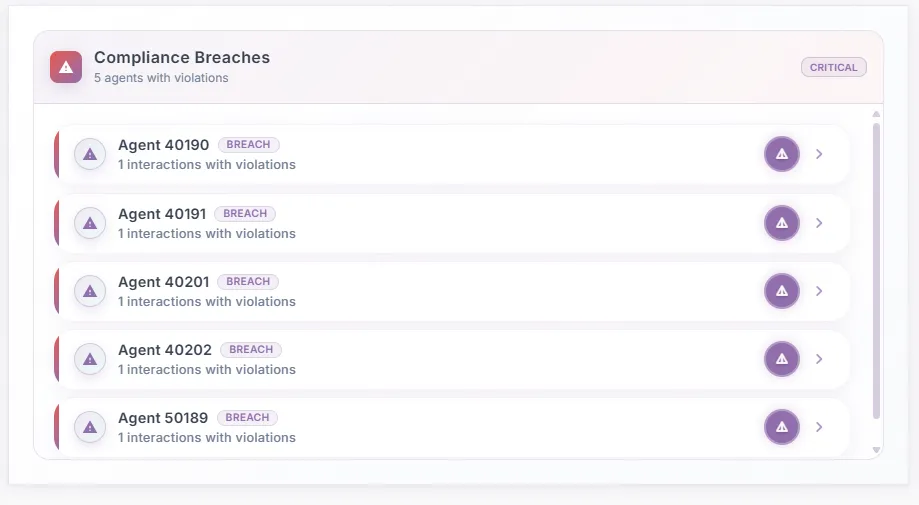
This widget provides a real-time snapshot of compliance breaches across agents. It highlights the number of agents with violations—in this case, five—and marks the overall status as Critical to indicate urgency. Each agent is listed with their unique ID, tagged with a Breach label, and shows the number of interactions that contained violations. The warning icon on the right suggests that supervisors can drill down for more details on the specific breach. By consolidating this information into a single view, the widget enables managers to quickly identify compliance risks, prioritize corrective actions, and ensure adherence to regulatory and organizational standards.
The Compliance Breach tab highlights violations detected during an interaction based on predefined compliance rules. It helps supervisors, auditors, and quality teams quickly identify risks, understand root causes, and take corrective action.
- Indicates that one or more compliance rules were violated during the interaction.
- The red warning icon and banner visually emphasize high priority and risk exposure.
- The Close (✕) button allows users to exit the view.
The tab shows
- Compliance Rule Status
- Compliance Insights Section
- Breach Detected
- Compliance Score
- AI Rationale - details or explaination on how that score was derived.
The Cases Pending section displays a list of all open customer cases that require action. It helps agents and supervisors track unresolved issues, prioritize follow-ups, and ensure timely resolution.
How to Use This Section
View Case Details
- Click on any case row or the arrow (›) icon.
- The detailed case view opens, showing:
- Full issue description
- Interaction history
- Compliance or sentiment insights (if applicable)
- Current status and next actions
Identify Priority Cases
- Cases with an alert icon (!)
- May indicate:
- SLA risk
- Compliance breach
- Escalation required
- Review these cases first to avoid delays or policy violations.
Manage Workload Efficiently
- Use the date and time to identify older pending cases.
- Prioritize cases based on:
- Issue type (e.g., refunds, credit cards)
- Customer impact
- Compliance sensitivity
The Resolution Pending screen provides visibility into interactions where the customer issue has not been successfully resolved. It helps quality teams, supervisors, and operations managers understand resolution gaps, root causes, and required follow-up actions.
Status & Flags Section Shows the Interaction Status, Coaching Needed information, Compliance Breach if any.