Watermark
2 min
Overview
Tetherfi's Watermark feature promotes data security by deterring agents from grabbing screen captures of customer or other important data.
Below is an example of 1 configuration of watermarking.
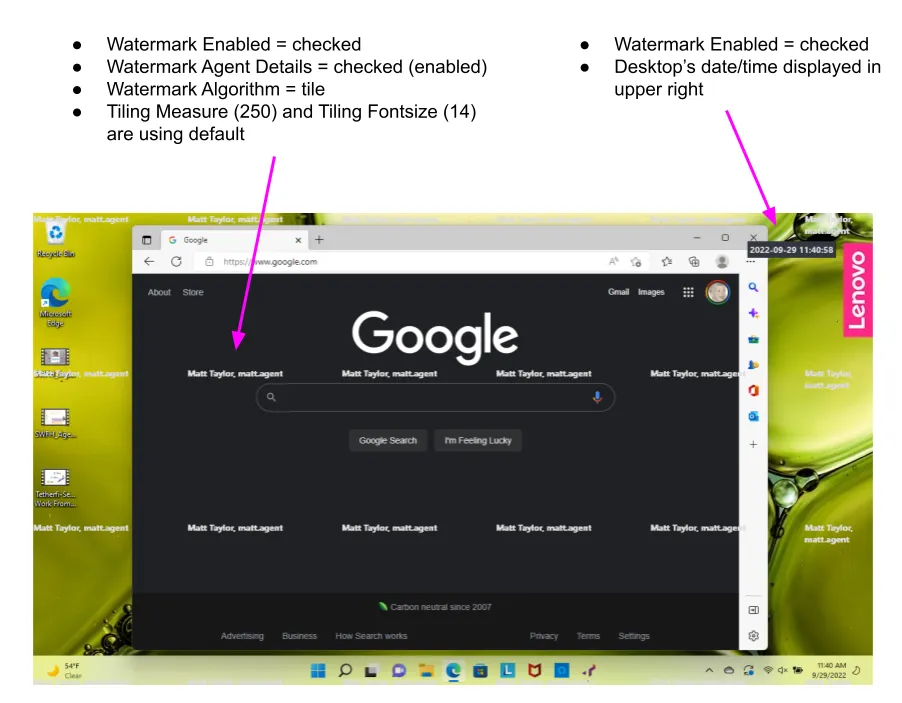
Feature Settings
- TRS_WATERMARK_ENABLED
- Turns the watermark feature on or off
- Valid values: true, false (default = false)
- TRS_WATERMARK_AGENT_DETAILS
- If true, the watermark shown is a combination of the agent's name and their lan id. For example, if the agent's first name is Jane, last name is Doe, and lan id is jdoe22, then "Jane Doe, jdoe22" would be used as the watermark.
- Valid values: true, false (default = true)
- TRS_WATERMARK_ALGORTHM
- If "tile", then the watermark is tiled across the screen based on the value of TRS_WATERMARK_TILING_MEASURE. If "center", the watermark is shown 1 time in the middle of the agent's screen.
- Valid values: tile, center
- TRS_WATERMARK_CONTENT
- Custom content to be used as the watermark. For example, if "Acme Financial" was entered as the value for this feature, "Acme Financial" would be used as a the watermark text.
- NOTE: TRS_WATERMARK_CONTENT and TRS_WATERMARK_AGENT_DETAILS are mutually exclusive. If both are enabled, ...AGENT_DETAILS takes precedence.
- Value values: a static string to be displayed
- TRS_WATERMARK_TILING_MEASURE
- Height in pixels to be used for tiling of the watermark when ..._ALGORTHM is set to "tile"
- Valid values: a positive number of pixels (default = 250)
- TRS_WATERMARK_TILING_FONTSIZE
- The font size (of the font "Segoe UI") used for the watermark text.
- Valid values: a valid font size
- TRS_WATERMARK_ALGORITHM - Setting this to "rotation" and TRS_WATERMARK_ROTATION_ANGLE with a value that takes an integer will make the watermarking configurable at any angle.