Auto Update
A feature in SWFH application to update to latest version in all agent machines without disturbing or involving any manual interactions. This software will help to update SWFH App on agent machines automatically without any manual interventions and outages.
How Auto Update works
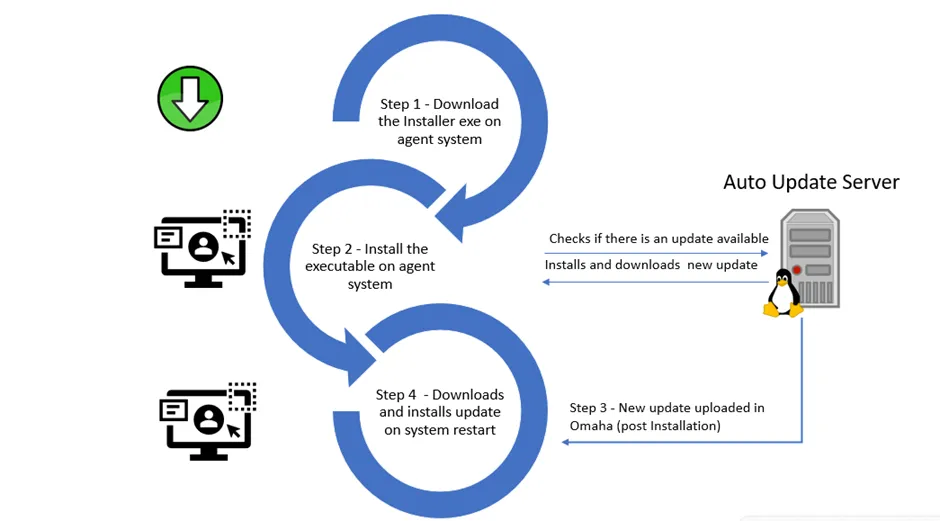
Pre-Requiste system requirements
Please refer System Requirements page to know more on mandatory system specifications for SWFH install.
Uninstall existing SWFH apps before Auto Enabling your SWFH App
Go to Add or Remove Programs and search for Tetherfi Secure Work from Home then select and uninstall.
Run the cleaner script provided by Tetherfi/IT team to cleanup all existing configurations.
Installation
An executable (Installer.exe) will be provided to the user. Double click on the exe and the installation will begin.
Your computer may ask you to allow the installation to continue.
If you see that this install is signed and verified by Tetherfi ("Verified publisher: TETHERFI PTS. LTD."), you can click "Yes" to continue.
If it does not show as signed and verified by Tetherfi, select "No" and contact your IT / Admin.
The installation is complete when the below window is shown.
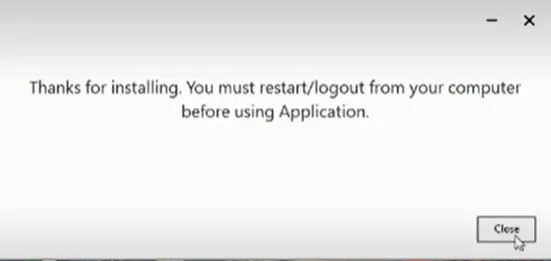
Restart or Log off from your computer and login again.
On restart, in case there is no update available, a message will pop up saying "Your system already has latest version of SWFH. Proceeding with application launch".
Once this message is seen, SWFH app will auto launch.
Verify / Enter Tetherfi Agent ID
You should have a valid Tetherfi user ID from your administrator. By default when it starts for the first time, Secure Work from Home uses the name of your user on your computer. If what shows up is not the same as the Tetherfi user ID you received from your administrator, click on the user name it shows for the computer and change it to your Tetherfi user ID.
Authenticate and Login
When ready, the Secure Work from Home application will confirm at the top of the window with the message "Agent features and face found, you can login now".
Assuming you are the agent, click on "FACE AUTH" to authenticate against your profile picture.
Next Update
Whenever there is an update, the IT team will upload the update in server.
Updates will be automatically and silently downloaded during the day when your system is on and silently installed once the system is booted up / next restart.
When you bootup your system the next day, a message pops up "SWFH update is available. Proceeding with application upgrade."
Click on Ok. The upgrade will start and the upgraded new UI version will be launched on the user desktop in a couple of minutes.
Login to SWFH app by entering your LANID.
FAQ's
Certain questions related to Auto update are below -
1. Pop up of “SWFH Update available. Proceeding with application upgrade” but then the system restarts or network connectivity is lost? What will happen to the upgrade.
Answer - On restart , the update will get installed and new version of SWFH UI will launch.
2. Pop up of “SWFH Update available. Proceeding with application upgrade” but then the system restarts? What will happen to the upgrade.
Answer - The existing UI launches. The update will occur in next restart of the system.
3. What does this error message or similar messages signify?
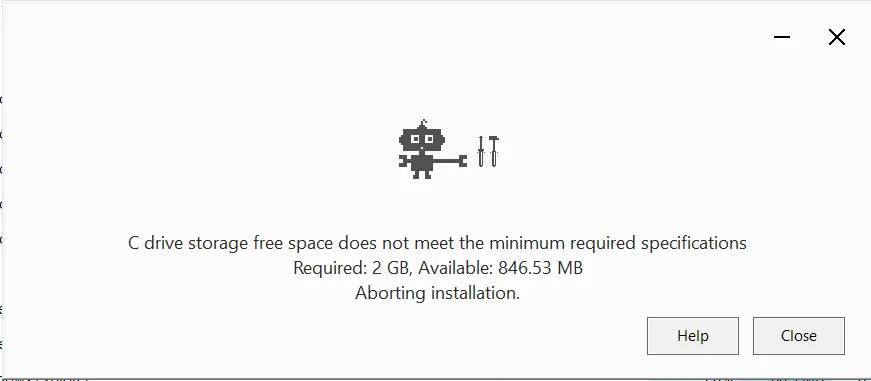
It signifies that the system specifications are not met. You need to contact your IT admin for upgrading your desktop/laptop.
/